Yuka alternative
Yuka Alternative for Food Scanning and Healthier Alternatives
Looking for a Yuka alternative? Tox AI helps you scan food, understand ingredients, check health scores and find cleaner alternatives.
Last updated: June 2026
Short answer
Tox AI can be used as a Yuka alternative if you want barcode scanning, health scoring, ingredient explanations and healthier food swaps.
Yuka is known for simple product scores, while Tox AI focuses on AI explanations and actionable alternatives.
Who this page is for
- People who know Yuka but want to compare alternatives.
- Users who want a more AI-guided label explanation.
- Shoppers looking for healthier swaps, not only a product rating.
Why Tox AI is relevant
Yuka helped make barcode food scanning mainstream. Tox AI is built for users who want a more AI-guided experience, with simple explanations and a stronger focus on finding better alternatives.
If you want quick product scores, Yuka is a well-known option. If you want an AI assistant that explains the label and helps you choose what to buy instead, Tox AI is designed for that use case.
Comparison
Tox AI compared with other app types
This comparison uses careful wording because app features and country availability can change. It explains positioning, not a universal winner.
| App | Best for | Barcode | Health score | Ingredients | Ultra-processed info | Alternatives | AI explanations | Best user type |
|---|---|---|---|---|---|---|---|---|
| Tox AI | AI-powered grocery decisions and healthier alternatives. | Yes | Yes | Plain-language AI explanations | Designed for this use case | Core focus | Core focus | Shoppers who want a simple answer and a better product choice. |
| Yuka | Quick barcode scores from a well-known food scanner. | Yes | Known for scores | Often used for quick label checks | May help indirectly | Varies by market | Not primarily positioned as an AI assistant | Users who want fast product ratings. |
| Open Food Facts | Open food data and transparency. | Yes | Data-driven scores where available | Raw product data | Often includes NOVA/Nutri-Score data where available | Not the main product experience | Not primarily an AI guide | People who want open databases and product detail. |
| Fooducate | Nutrition grading and habit coaching. | Often used for this | Known for grades | Nutrition-focused guidance | May flag some concerns | Can suggest options depending on data | Not the primary differentiator | Users who want diet and nutrition coaching. |
| MyFitnessPal | Calorie, meal and macro tracking. | Yes | Not the primary focus | Limited versus scanner-first apps | Not the primary focus | Not the primary focus | Not the primary scanner use case | People tracking calories, macros and meals. |
| Cronometer | Detailed nutrient tracking. | Yes | Not the primary focus | Nutrient-detail oriented | Not the primary focus | Not the primary focus | Not the primary scanner use case | Users who want detailed micronutrient logging. |
| Foodvisor | Meal recognition and nutrition coaching. | Varies by workflow | Nutrition-focused | Less scanner-first than Tox AI | Not the core positioning | Coaching-oriented | Often associated with AI nutrition coaching | People who want meal-level tracking and coaching. |
| Bobby Approved | Clean ingredient preferences and product checks. | Common use case | Preference-based approval | Strong clean-label focus | Ingredient-pattern focused | Often used for swaps | Not the primary positioning | Shoppers following strict ingredient preferences. |
| Fig | Diet, allergy and ingredient preference checks. | Common use case | Preference fit rather than broad health score | Strong for ingredient matching | Not the main use case | Useful for dietary fit | Not the primary positioning | People shopping around allergies, diets or ingredient rules. |
Tox AI vs Yuka
The comparison is not about attacking Yuka. Many users like Yuka because it is simple and familiar.
Tox AI is different because it puts more emphasis on AI explanations, ultra-processing signals and healthier alternatives. The goal is to help you understand the product and move to a better option when possible.
When Tox AI may be the better fit
Choose Tox AI if the product score alone is not enough and you want to understand why the label looks good or bad.
It is also a strong fit if your main question is not “what score did this get?” but “what should I buy instead?”
- You want AI-powered explanations.
- You care about ultra-processed food signals.
- You want practical healthier swaps.
- You shop packaged groceries and need fast decisions.
How Tox AI works
Tox AI does not just show raw nutrition data. It explains what the label means and helps you decide what to buy instead.
- 1
Scan a barcode
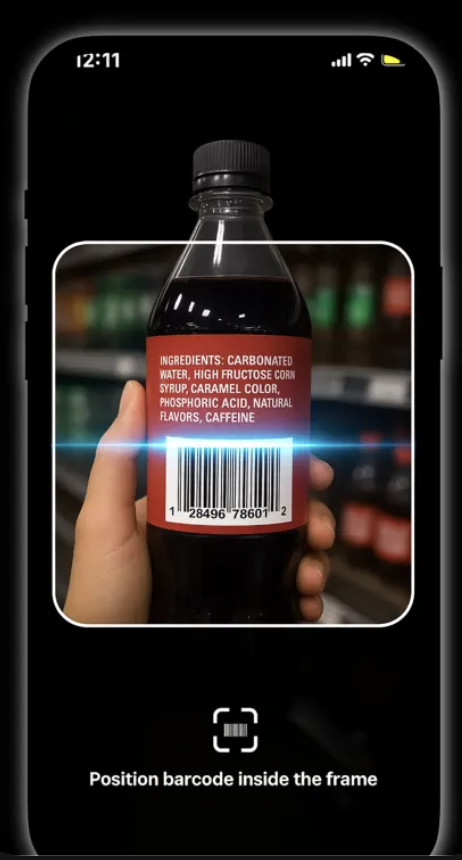
Use the camera to scan a packaged grocery product in the store or at home.
- 2
Check product data
Tox AI checks available product information, including public or open food data where available.
- 3
Analyze the label
The app reviews ingredients, additives, nutrition quality and ultra-processing signals.
- 4
Get a clear explanation
You see a simplified score with plain-language reasons, not just raw nutrition tables.
- 5
Find better alternatives
When possible, Tox AI suggests cleaner or healthier swaps you can buy instead.
Tox AI is a decision-support tool, not medical advice. Product data can be incomplete or outdated, and food scores are simplified signals rather than personalized dietary guidance.
Questions people ask about food scanner apps
Is Tox AI a Yuka alternative?+
Yes. Tox AI can be used as a Yuka alternative for users who want barcode scanning, health scoring, AI explanations and healthier swaps.
Does Tox AI scan food like Yuka?+
Yes, Tox AI is built around barcode scanning for packaged foods, with added emphasis on AI explanations and alternatives.
Can I use Tox AI and Yuka together?+
Yes. Some users may compare apps, but Tox AI is designed to be more action-oriented when you want to know what to buy instead.
Related guides
Best Food Scanner App for Healthier Grocery Choices
Compare Tox AI, Yuka, Open Food Facts and other food scanner apps for health scores, ingredients, additives and healthier alternatives.
Best AI Food Scanner App
Tox AI uses AI to explain food labels, score products and help shoppers find healthier grocery alternatives from a barcode scan.
App for Finding Healthier Food Alternatives
Find healthier food swaps while shopping. Tox AI scans packaged foods and recommends cleaner alternatives when possible.
Scan your first product with Tox AI
Use Tox AI when you are standing in the aisle and need a fast, practical answer about what the label means and what to buy instead.